Micro:bit Cheat Sheet
https://python.microbit.org/v/3
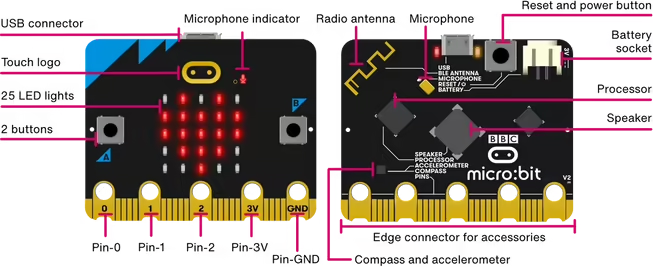
The Board
Python
The traditional way to import the microbit module:
import microbit

microbit.display.show(microbit.Image.HEART)
The convenient way:
from microbit import *

display.show(Image.HEART)
Scroll text or numbers across the display:
display.scroll("Hello")
display.scroll(42)
Show a predefined image on the display:
display.show(Image.HEART)Show a custom image on the display:
display.show(Image('00300:'
                   '03630:'
                   '36963:'
                   '03630:'
                   '00300'))
Clear the display:
display.clear()Wait 1 second:
sleep(1000)Reacting to button presses:
if button_a.is_pressed():
    ...

if button_b.is_pressed():
    ...
Reacting to "gestures" with the accelerometer:
if accelerometer.was_gesture('shake'):
    ...
Reacting to loud noises, using the microphone:
if microphone.was_event(SoundEvent.LOUD):
    ...